基于h5+的微信登录,hbuilder打包
- 具体步骤如下:
步骤一:
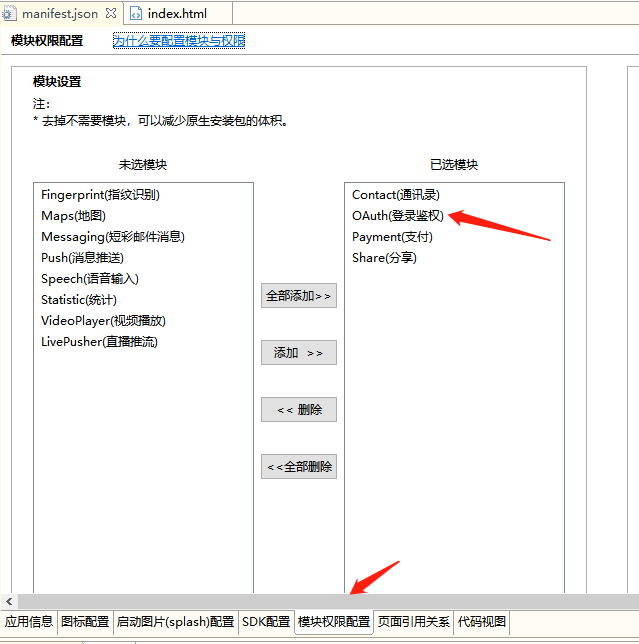
打开app项目的manifest.json的文件,选择模块权限配置,将OAuth(登录鉴权)模块添加至已选模块中
步骤二:
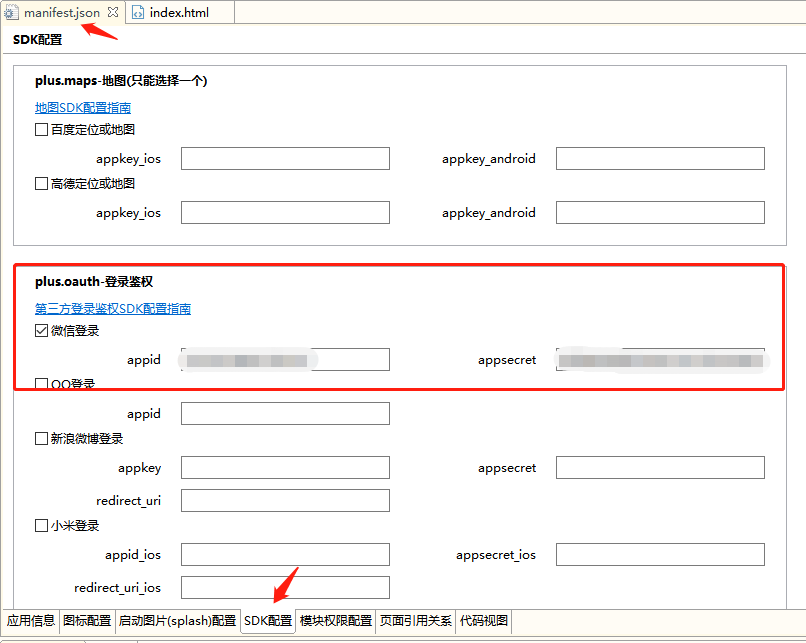
选择SDK配置,在plus.oauuth·登录鉴权中,勾选□ 微信登录,配置好appid和appsecret值(appid/appsecret可以在微信开发者平台创建应用获取)
步骤三:
项目JS文件中的微信支付代码如下(基于vue开发):
wxLoginFn() {
    let self = this;
    getService()

    // 微信授权登录对象
    let aweixin = null;
    // 当前环境支持的所有授权登录对象
    let auths = null;

    // 获取登录授权认证服务列表,单独保存微信登录授权对象
    function getService(){
        plus.oauth.getServices(function(services){
            // plus.nativeUI.alert("services:"+JSON.stringify(services));
            auths = services;
            authLogin()
        }, function(e){
            plus.nativeUI.alert("获取登录授权服务列表失败,请稍后重试");
            // plus.nativeUI.alert("获取登录授权服务列表失败:"+JSON.stringify(e));
        } );
    }

    // 获取微信登录授权对象后可进行登录认证操作
    function authLogin(){
        for(let i = 0; i < auths.length; i++){
            if(auths[i].id == 'weixin'){
                aweixin = auths[i];
                break;
            }
        }
        if(!aweixin){
            plus.nativeUI.alert("当前环境不支持微信登录");
            return;
        }
        if(!aweixin.authResult){
            aweixin.login(function(e){
                // plus.nativeUI.alert("登录认证成功!"+JSON.stringify(e));
                authUserInfo()
            }, function(e){
                // plus.nativeUI.alert("登录认证失败: "+JSON.stringify(e));
            } );
        }else{
            authUserInfo()
            console.log("已经登录认证!");
        }
    }

    // 获取微信登录授权对象后获取用户信息操作
    function authUserInfo(){
        Toast.loading({
            mask: true,
            message: '微信登录中...'
        });

        if(!aweixin){
            Toast.clear();
            plus.nativeUI.alert("当前环境不支持微信登录");
            return;
        }
        if(aweixin.authResult){
            aweixin.getUserInfo( function(e){
                Toast.clear();
                // plus.nativeUI.alert("获取用户信息成功:"+JSON.stringify(aweixin.userInfo));
                let wxUserInfo = aweixin.userInfo;
                Storage.set('wxUserInfo', JSON.stringify(wxUserInfo));
                authLoginOut(); //注销登录防止切换账号获取到旧信息
            }, function(e){
                console.log("获取用户信息失败: "+JSON.stringify(e));
            } );
        }else{
            Toast.clear();
            plus.nativeUI.alert("未登录认证!");
        }
    }

    // 注销登录认证
    function authLoginOut(){
        if(!aweixin){
            plus.nativeUI.alert("当前环境不支持微信登录");
            return;
        }
        aweixin.logout(function(e){
            // plus.nativeUI.alert("注销登录认证成功!"+JSON.stringify(e));
        }, function(e){
            console.log("注销登录认证失败: "+JSON.stringify(e));
        });
    }
}
1
2
3
4
5
6
7
8
9
10
11
12
13
14
15
16
17
18
19
20
21
22
23
24
25
26
27
28
29
30
31
32
33
34
35
36
37
38
39
40
41
42
43
44
45
46
47
48
49
50
51
52
53
54
55
56
57
58
59
60
61
62
63
64
65
66
67
68
69
70
71
72
73
74
75
76
77
78
79
80
81
82
83
84
85
86
87
2
3
4
5
6
7
8
9
10
11
12
13
14
15
16
17
18
19
20
21
22
23
24
25
26
27
28
29
30
31
32
33
34
35
36
37
38
39
40
41
42
43
44
45
46
47
48
49
50
51
52
53
54
55
56
57
58
59
60
61
62
63
64
65
66
67
68
69
70
71
72
73
74
75
76
77
78
79
80
81
82
83
84
85
86
87